The Context agent
in your terminal
Install the CLI on your laptop, pair it with your workspace once, and hand it real work — on any model in the catalog, frontier or open-weight.
curl -fsSL https://workspace.context.ai/install.sh | bashmacOS · Linux · Windows (WSL 2) · install options
Your terminal, your team's task list
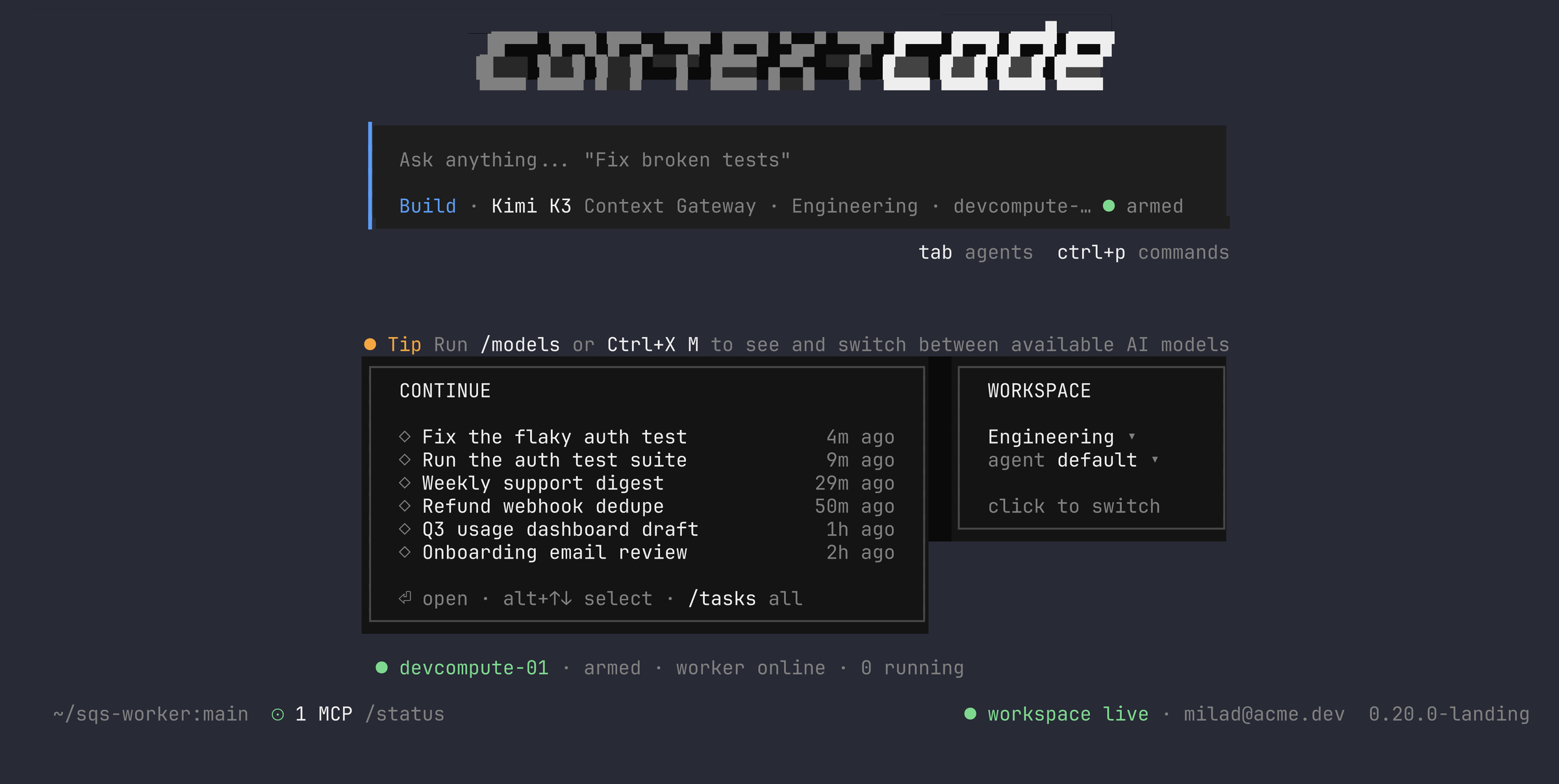
Sessions run on your machine with your files and your shell — and land in the workspace task list, visible to the team and billed to one account.
Any model, per session




Open-weight rates change the math
The same month of tokens costs a different amount depending on who runs them. The arithmetic — and its sources — is below.
MIT at the base
Context's distribution of the MIT-licensed Hermes Agent. Read the code before you run it.
One task list, every machine
A session in the terminal is a task in your workspace. The team can watch it stream, answer it, and pick it up on another machine without losing the thread.
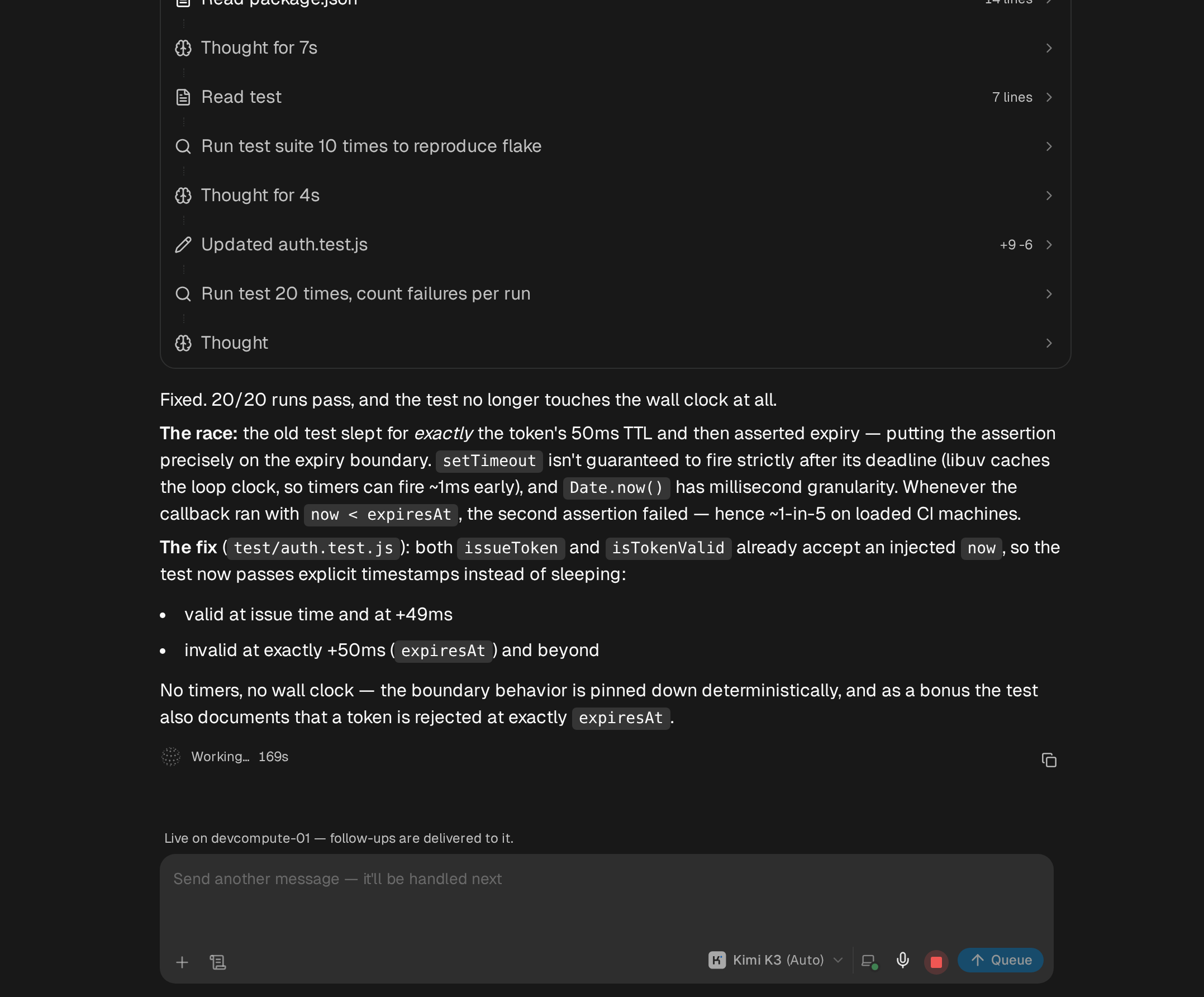
Sessions stream to the workspace live.
Start a session in the terminal and it lands in the task list. Teammates open the task in the browser and read the plan, the diff, and the test results as they happen. The page names the machine the session is live on, and follow-ups typed there are delivered to it.
Pick any task up on your machine.
Run the continue command and pick from your recent tasks, or paste a task link from the workspace. The session opens in your terminal with its full history, and your next message continues it here.
context-code continue <task link>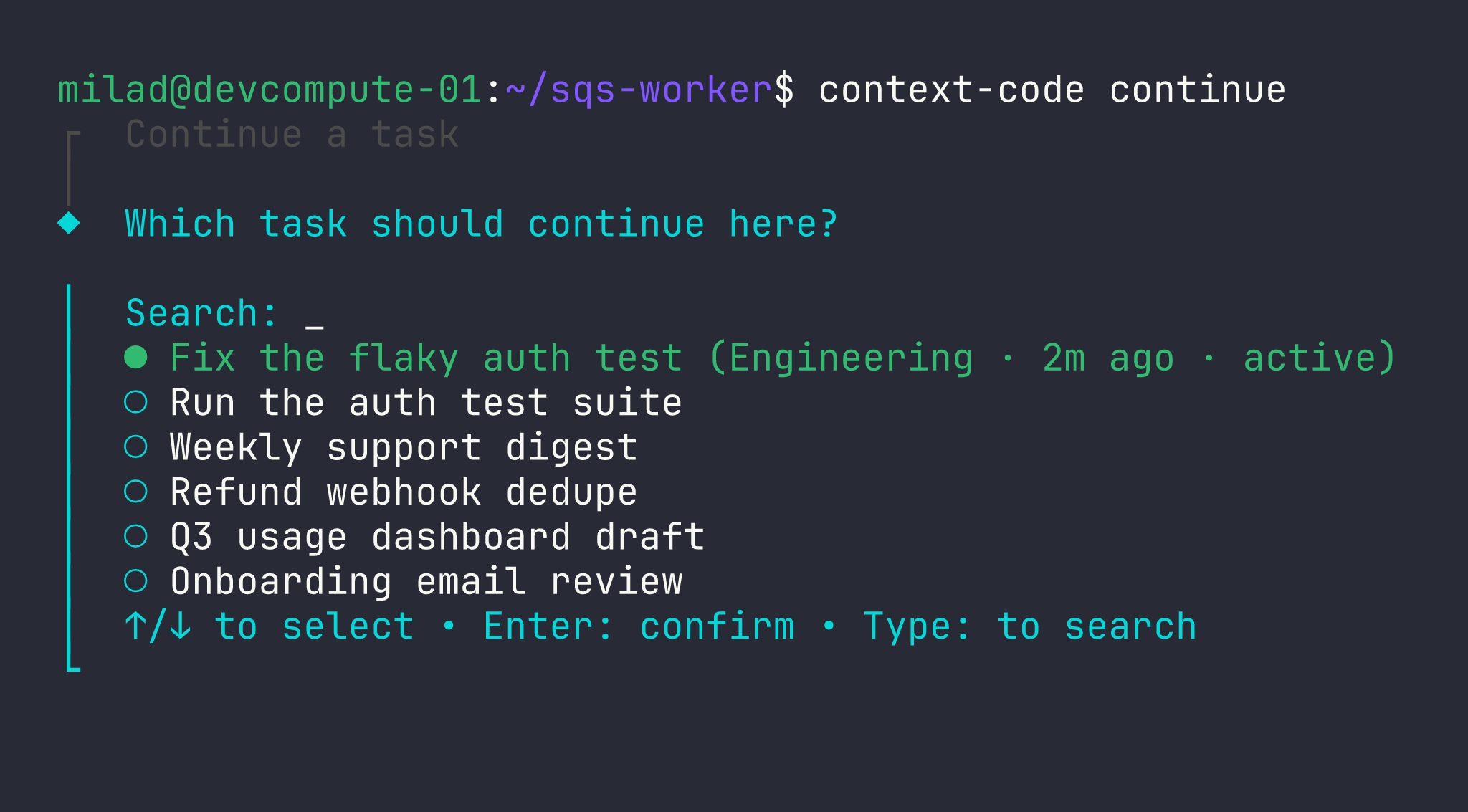
Arm a machine and send work to it.
The worker command keeps a machine listening for dispatched tasks. Start a task in the workspace, target that machine, and the run executes there and syncs its transcript back to the task when it settles.
context-code worker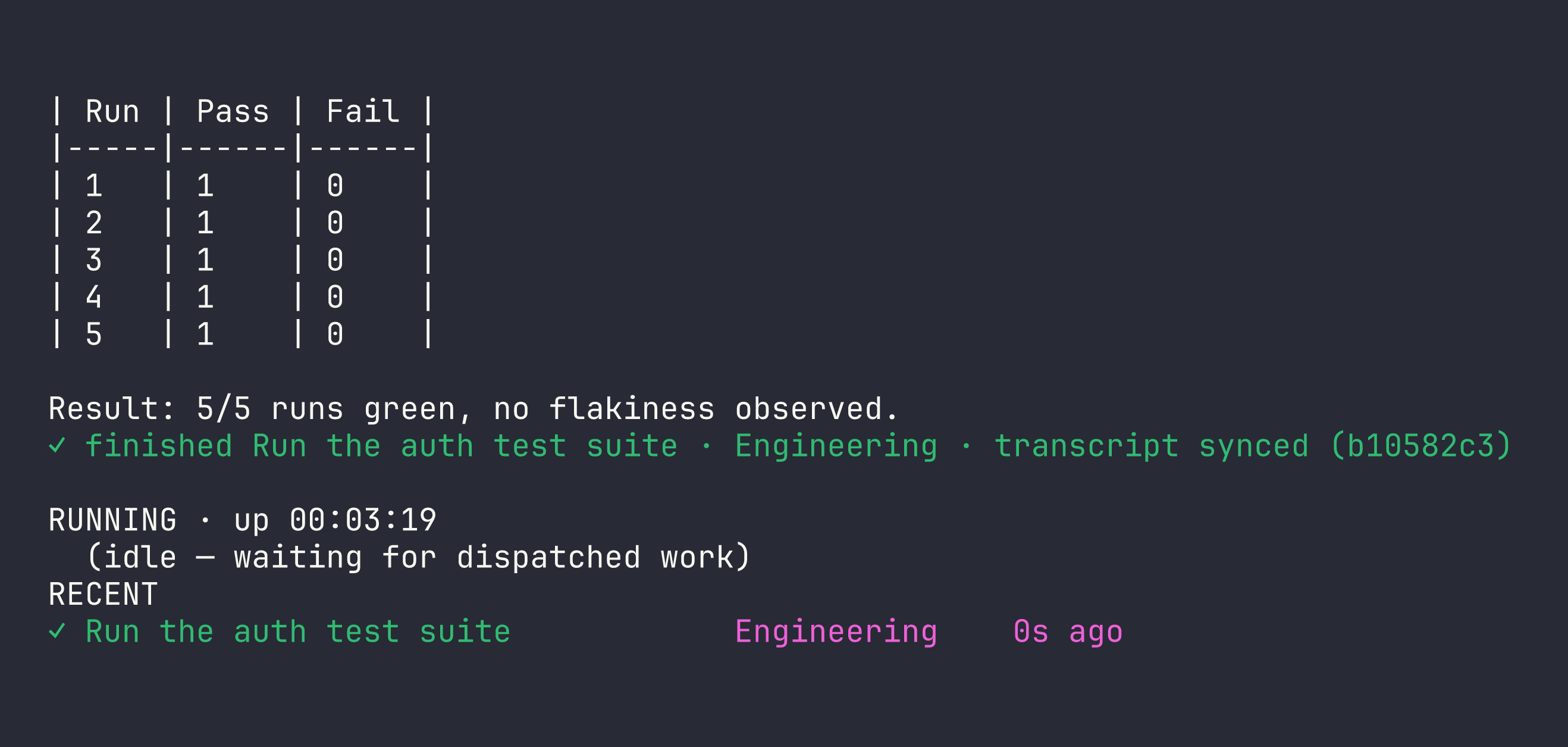
Open weights are frontier-class now
The open-weight rows in the catalog are not budget stand-ins: Kimi K3 scores above Claude Opus 4.8 and within a few points of Anthropic's newest, at a fraction of the list rates. Index v4.1.1 and vendor prices, read 2026-08-14.
Kimi K3 on Artificial Analysis' Intelligence Index — the highest-ranked open-weights model
Claude Opus 4.8 on the same index — Anthropic's newest models score 61 to 63
DeepSeek V4 Pro output rate per million tokens, at the vendor's published list price
A month of usage, priced from list rates
One month of steady agent work — 40M input and 4M output tokens — at each vendor's published list rates on 2026-08-14, with no caching or batch discounts. context-code sessions bill as workspace task usage on whichever catalog model you pick — including the open-weight rows.
Sources, read 2026-08-14: Anthropic list rates · Kimi K3 rates · DeepSeek rates · Claude Code plans. Caching lowers every number. Claude Code reaches Claude rates on an API key, or a Pro/Max subscription at $20 to $200 a month with unpublished usage limits. DeepSeek has announced peak/off-peak billing from 2026-08-16, with off-peak at half the listed rates.
Install, log in, work
From an empty laptop to an agent session in your workspace in three steps. The install script and the release channel are the same ones every workspace deployment serves.
The installer downloads the current release, verifies it against the SHA-256 in the public manifest, and puts context-code on your PATH.
- macOS · Linux — one command
- Windows — WSL 2, same command
- Re-running the installer on the same version keeps the existing install.
$ curl -fsSL https://workspace.context.ai/install.sh | bash
◆ context-code Installer
Downloading context-code-0.19.0.post1.tar.gz...
✓ context-code v0.19.0.post1 ready
context-code login prints a pairing code and an approval link. Approving it in the workspace provisions the CLI's agent and mints a key named after the device.
- One key per device, named after it
- Revocable on its own from the workspace
- Nothing is pasted into the terminal.
Run context-code and give it a task. The session executes on your machine with your files and your shell, shows up in the workspace task list, and bills to your account like any other task.
- Visible in the workspace task list
- Billed as workspace task usage
- context-code update pulls the next checksum-verified release.
Weighing it against Claude Code?
Claude Code is Anthropic's own CLI, and for teams that want Claude models on a first-party tool it is an excellent choice. context-code trades that vendor depth for the whole model catalog, open-weight economics, an MIT open base, and sessions the rest of your team can see.
Vendor facts read 2026-08-14; sources on the comparison page.
Security and distribution
The record behind the install command: what ships, how it is verified, and what a paired device can do.
- Verified installs
- Every download is checked against the manifest's SHA-256 and aborts on a mismatch. context-code update pulls from the same channel.
- Current release
- v0.19.0.post1, built 2026-08-13. Published with its checksums in a public release manifest.
- Published checksums
- SHA-256 · tarball430ea177cdfc31162cd265e069a25f7e1c76a128e8aff85bbdf75484e1c0ef7fSHA-256 · zip206382d765ab93d8947c6c31cd7e04b0c7d04f4f32c495089bbe993cfdd396ed
- Revocable device keys
- Pairing mints a key named after the device — nothing pasted into the terminal. Each device's key can be revoked on its own from the workspace.
- Visible sessions
- Every CLI session appears in the workspace task list and bills to the workspace account — nothing runs invisibly on a side credential.
- License
- Built on Hermes Agent by Nous Research, MIT license. context-code is Context's distribution of that project.
Values recorded 2026-08-14 from the release manifest.
Start your first session
Install context-code, pair it with your workspace, and the session shows up in your task list like any other agent run. No workspace yet? Creating one takes a minute.
Open your workspace