
Build, deploy, and improve AI agents.
Run them on your infrastructure, under your controls.
Hundreds of exceptional teams build on Context
 Case study1,600+production agent workflows


 62%fewer escalations to field engineers


 11kagent runs a day on one deployment


 $18Min annual review hours returned to engineering


Everything agents need to work in production.
Your team and its agents, in one workspace
Chat, files, tasks and skills in one place, where every agent is a named member that works under the permissions of the person who asked.
Run agents on the models you choose
Pick a model from every major maker or add your own. Each task runs in its own sandbox on your cluster, on a schedule if you want, until the work is done.
Connect your agents to your tools
Each person connects their own accounts, admins register your internal services, and agents search every file the person can open.


Workspace01 of 04
Your team and its agents, in one workspace
Chat, files, tasks and skills in one place, where every agent is a named member that works under the permissions of the person who asked.
- Hand work to an agent
- Keep the work in one place
- Build internal tools from a request
Engine02 of 04
Run agents on the models you choose
Pick a model from every major maker or add your own. Each task runs in its own sandbox on your cluster, on a schedule if you want, until the work is done.
- Choose the model for each task
- Give every task its own sandbox
- Put recurring work on a schedule
Unify03 of 04
Connect your agents to your tools
Each person connects their own accounts, admins register your internal services, and agents search every file the person can open.
- Connect the apps your team uses
- Register your internal services
- Search every file you can open
Evals04 of 04
Work that gets better every week
Every run is scored on your criteria, every failure improves a skill, and once a person approves the change, every run after it starts from there.
- Score every run in production
- Turn failed criteria into a better skill
- Improve on the same model
Built for production work.
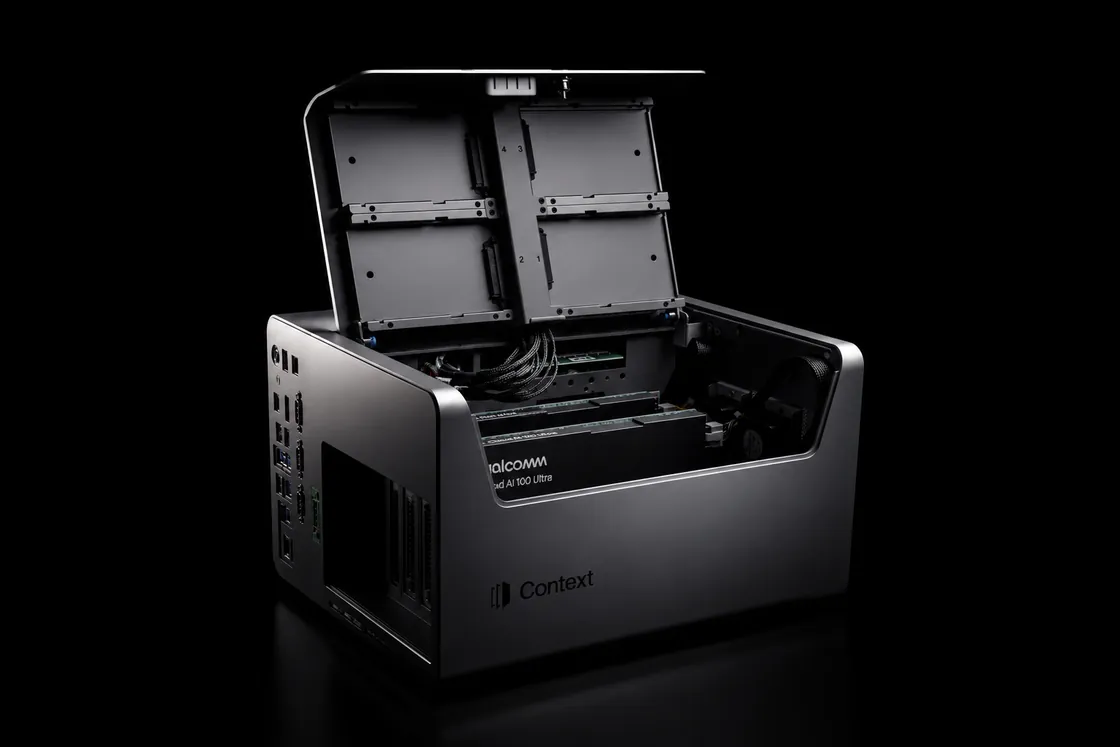
Run anywhere.
Hosted. Your VPC. Air-gapped. The on-prem Context appliance.
Use any model or agent.
Claude, GPT, Gemini, Kimi, or open weights. Bring your own agent framework, or use ours.





Enterprise-grade authorization.
Identity through your IdP. Customer-managed keys. Audit on every action. Permissions inherited at every connector call.



A complete working environment.
Documents, spreadsheets, decks, kanbans, and file viewers built in. Your team and agents work on the same files in the same environment.
Faster, cheaper, better
Custom models trained on your work
Your team's accepted outputs become training data for models you own and serve, and they beat general-purpose agents on your specific tasks.
Evals gate every change
Rubrics and golden sets check every skill, model and context change against past work before it ships, so regressions are caught.
Step-level model routing
Each step routes to the cheapest model that clears your rubric. Frontier models handle only the genuinely novel, so cost falls without losing quality.
The same model, better every week
Every run is scored, every failure improves a skill, and once a person approves the change, every run after it starts from there.
Agents do the work
Every task runs with the permissions of the person who asked, and every step is recorded.
You09:20Build the Q3 review deck from the updates doc and the valuation bridge. Same structure as Q2, the three flagged companies up front.
Context09:20Reading the Q3 updates and the bridge workbook, then drafting from the Q2 template.
Q3 portfolio review deckDone in 3 min 48 s- Read q3-portfolio-updates.docx, 14 companies
- Read q3-valuation-bridge.xlsx, 3 scenarios
- Draft slides from the Q2 template, 18 slides
- Place the flagged companies first, Northwind, Fenwick, Alder
- Render q3-portfolio-review.pptx, 4.1 MB
- Wrote q3-portfolio-review.pptx, 4.1 MB
Wrote q3-portfolio-review.pptx, 4.1 MBq3-portfolio-review.pptxworkspaces/b/q3-portfolio-review-deckDeck · 4.1 MBContext09:24Deck is ready: 18 slides, the three variance companies on slides 3 to 5 with the covenant tests beside each, the full portfolio table in the appendix.
q3-portfolio-review.pptx4.1 MB · 18 slidesYou09:31Add the covenant headroom chart from the workbook to the Fenwick slide.
Context09:31Added. Slide 5 now carries the interest-cover chart with the 2.0x test line; the appendix table is unchanged.
Share the deck with #q3-portfolio-review?Posts q3-portfolio-review.pptx to the channel and notifies the four members.ShareNot yetAsk anythingEvals score every run
Scorecards written by your own experts grade each run, so every failure has a name and a reason.
Q3 portfolio review deck
Atlas · Brindle Capital
Maya Okafor · Today 09:24
- Workspace:
- Brindle Capital
- Avg Rating:
- 2.0
- Feedback:
- 1
- Messages:
- 6
- Runs:
- 1
- Attempts:
- 1
Skills used:Quarterly portfolio reviewPrompt
# Where this task came fromYou were dispatched by Atlas, a Together agent, from the public channel #q3-portfolio-review, at the request of Maya Okafor.
Feedback
Deck qualityProject FeedbackToday, 09:41- Flagged companies lead the deckYes
- Covenant test beside each flagged companyNoPriya Natarajan · Fenwick's slide has no covenant chart.
- Appendix table completeYes
- Overall2 / 5
Additional FeedbackFenwick's slide has no covenant chart. The workbook's Fenwick tab holds the test.
Failures become better skills
A learning run reads the failed criteria, drafts the next version of the skill and tests it against past runs.
Quarterly portfolio reviewQuarterly portfolio reviewSavedv3Quarterly portfolio reviewBuild the quarterly review deck from the updates doc and the valuation bridge, flagged companies first.
- Scope
- Brindle Capital
- Tags
- portfolio
- Files
- SKILL.md deck-template.pptx Add files
- Connectors
- + Attach
- Scorecards
- Deck quality
Steps
- Read the quarter's updates doc and the valuation bridge workbook.
- Draft the slides from last quarter's template, one company per slide.
- Place every company more than 10% off plan first, on slides 3 to 5.
- Add the covenant chart from the workbook to each flagged company's slide.
- Render the deck and post it to the review channel with the flagged companies named.
Written by
Atlas · from the Q3 review deck task
Every run starts from the fix
Once a person approves the new version, every run after it starts from that improvement, on any model.
Quarterly portfolio reviewQuarterly portfolio reviewSavedv3Version historyEvery save of this skill. Restore brings a version back as the newest one.Version history
- Version 3Current
- Version 2Restore
- Version 1Restore
Quarterly portfolio reviewBuild the quarterly review deck from the updates doc and the valuation bridge, flagged companies first.
- Scope
- Brindle Capital
- Tags
- portfolio
- Files
- SKILL.md deck-template.pptx Add files
- Connectors
- + Attach
- Scorecards
- Deck quality
Steps
- Read the quarter's updates doc and the valuation bridge workbook.
- Draft the slides from last quarter's template, one company per slide.
- Place every company more than 10% off plan first, on slides 3 to 5.
- Render the deck and post it to the review channel with the flagged companies named.
Written by
Atlas · from the Q3 review deck task


Task pass rate over four months, with one marker for each stage. Measured at Qualcomm: 23% to 98% over four months on the same model. The shape of the curve between those points is illustrative.
Own your intelligence
How Context compares to Codex, Claude, Copilot and Gemini Enterprise. Host it in your own cloud, run any model on your own keys, and keep your data and the skills your team builds. Hover a mark for the fact and its source.
| Difference | Context | CodexOpenAI | ClaudeAnthropic | CopilotMicrosoft | GeminiGoogle Enterprise |
|---|---|---|---|---|---|
| Any model, on your own keys | |||||
| Runs in your own cloud or air-gapped | |||||
| Every run scored, skills improved | |||||
| Agents act as the person | |||||
| Agents work inside the team |


A dash means partly, or that the vendor's pages did not specify this when read on 21 September 2026. See all nine questions
Industries
Built for the work in your industry.
Prebuilt agents for industry-specific workflows, systems, and controls.
Connectors
Connects to the tools you already use
Connect a source once. Agents read, work, and write back under the access rules you set.
800+ connectors across data warehouses, documents, CRMs, ticketing, and internal systems.



Your workflow, running in your environment.
Bring a workflow your team runs today and watch it run on your data, with your permissions.